






Matt Larder
Head of Cloud, Softcat

Mark Swift
Senior Architect - AWS, Softcat
Migrating infrastructure and modernising applications to AWS is a well-trodden path. AWS offers heaps of publicly available advice and guidance with many built-in tools to help you move servers, data and applications. However, there are additional elements to consider, and guidance is needed when moving enterprise-specific workloads such as Oracle, Citrix, and SAP.
We’ve created this multi-part blog to explore the advantages, considerations and pitfalls when migrating/modernising such enterprise apps.
First up is SAP
Organisations are migrating their SAP workloads as a part of their digital transformation strategy to deal with compatibility issues, performance improvements and end-of-life platform upgrades.
But SAP isn’t your regular line of business application – a deployment typically integrates with processes and teams across the business (finance, operations, HR, logistics and so on), often making it more complicated to migrate/modernise.
Often SAP is a prime candidate for customisation, making a modernisation far more complex, yet still the preferred route to move to a modern architecture such as S/4HANA.
Let’s take a brief look at some of the common advantages, considerations and pitfalls in moving SAP to AWS:
Advantages
• Performance improvements, for example, for the SAP NetWeaver service, we can leverage the latest generation of general-purpose instances powered by Intel Xeon® Platinum 8175M or 8259CL processors. These instances provide a balance of computing, memory, and network resources. For SAP components that are memory intensive, such as the SAP HANA, which is the in-memory database, there are u-24tb1.metal instances, which have up to 48 TB of RAM. AWS has a comprehensive computing range, meaning that the most performant and cost-effective solution can be architected with the correct size.
• High availability is more dynamic in AWS as it has strategies such as auto scaling groups, which can scale in and out the instance type when there is compute demand; this is particularly useful during critical SAP processing periods, such as when additional SAP Business Object servers are required to meet more demand for financial reporting. During these periods, servers scale out to meet demand. The trigger to scale is driven by performance characteristics such as CPU utilisation thresholds; as performance demand reduces, the servers are scaled back.
• Reduced total cost of ownership (TCO) in AWS can be achieved by leveraging PaaS services such as AWS RDS for database administration. RDS supports both MSSQL and Oracle databases, which are standard relation database solutions for SAP ERP.
• Sustainability goals can be better achieved in AWS by leveraging auditing services to monitor the sustainability footprint in your AWS account. Using AWS's elasticity, resources can be introduced and removed, or right-sized to ensure the SAP footprint is sustainably optimised.
Consideration 1 – SAP Future State
The very first step will require you to look at the current state of your SAP installation – how customised it is, how old it is and what business changes are expected. Softcat itself is not an expert in this space and we typically work with SAP and/or preferred partners to explore this, or be the beneficiary of this output.
However, there are plenty of scenarios that offer a straightforward path from the outset, e.g. the SAP installation is not that old but the infrastructure it resides on is. Or for example, the data centre it resides in needs to close, which in many cases can warrant a more straightforward migration.
But even in cases where the versioning and SAP installation are not changing, we need to address questions around the AWS implementation and platform-related changes which can be introduced. These include:
Database architecture – a key platforming change could explore moving from dedicated database instances to AWS’s relational database service/RDS. This can help reduce licensing costs, utilise the built-in high availability and scalable architecture that RDS offers as well as reduce all dependencies on underlying infrastructure and the need to maintain it.
File Services and Data Transfer - a typical scenario sees the SAP shared file systems (ERP Transports, BW Transports) utilise the SMB file share service in AWS called FSx for Windows, thus replacing traditional on-premises file servers or storage. FSx for Windows provides a fully managed SMB file server solution, with similar benefits to AWS RDS outlined above.
Similarly, when performing the dependency mapping, it's critical to establish the requirements for SAP data that are published and consumed between third parties. AWS Transfer family provides a managed service for this purpose. Depending on the third parties' requirements, the following transfer protocols are supported:
• Secure Shell (SSH) File Transfer Protocol (SFTP): version 3
• File Transfer Protocol Secure (FTPS)
• File Transfer Protocol (FTP)
• Applicability Statement 2 (AS2)
In the example below, we can see how SAP file shares are consumed by third parties who need to collect SAP data from the AWS Transfer SFTP site.

|
ID |
Step |
Detail |
|
1 |
Third-party access to the AWS Transfer FTP site is made via an AWS Site-to-Site VPN connection. |
The third parties and the AWS site-to-site VPN service establish a point-to-point VPN connection. |
|
2 |
Authentication |
VPN authentication is performed by Active Directory, where the third-party credentials reside; these credentials are mapped to AWS Security Centre, where they are provisioned to perform the FTP actions. An SSH-RSA key is also generated for access credentials. |
|
3 |
File Transfer between third parties |
The AWS Transfer service will run an FTP service for SAP file sharing and reside in the Shared Services account so that all Accounts within the AWS organisation can use this service. |
|
4 |
SAP integration with FTP |
SAP files residing in the SMB shares on AWS FSx SAP are published to the FTP site and consumed by third parties. Connectivity between the SAP instance and the FTP site is made available through the AWS Transit Gateway Hub and Spoke topology network. |
Consideration 2 – Architecture and Cost
With a SAP system running on Microsoft Windows Server infrastructure and the SQL Server database, there is SQL Server licensing (runtime licences), which forms part of the SAP licence and support fee, and the recommended and most cost-effective option when migrating to AWS is to use the Bring Your Own Licence (BYOL) approach.
This approach has some constraints when modelling the architecture, including using AWS dedicated hosts and placing an instance type in that host.
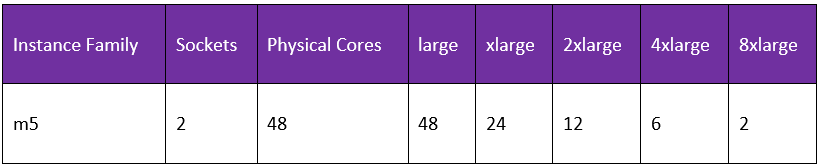
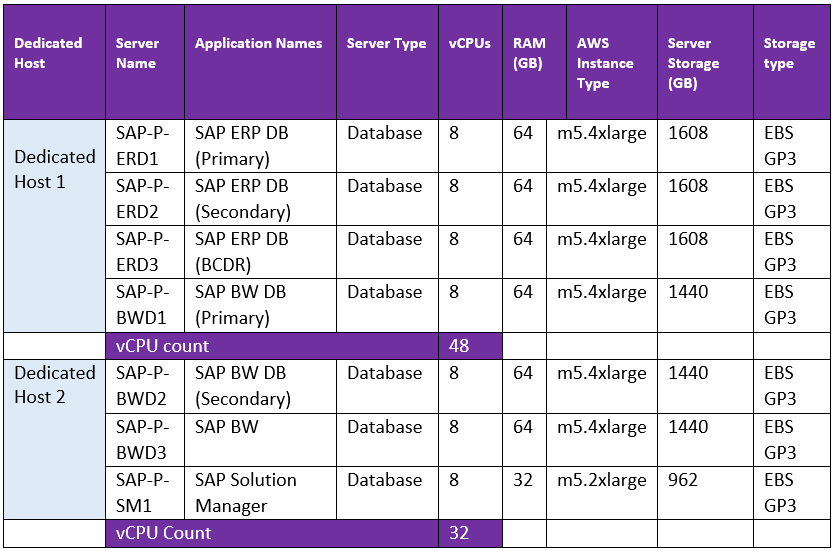
In this example, there are seven SAP Production database workloads to be modelled on a dedicated host running the m5 series instance type to leverage the benefits of Windows BYOL; the modelling guidance in the table indicates how many cores are available on the dedicated host as well as the amount of instance types we can run on the dedicated host.
As a result, the following MSSQL instances have been modelled on two dedicated hosts to keep within the vCPU constraints.
Consideration 3 – Securing SAP Support
The SAProuter is a software application running on an AWS instance that provides a remote connection between SAP support and the SAP implementation in AWS.
The SAProuter needs to be deployed in a public subnet and assigned a public IP address that is reachable from the internet to enable integration with the SAP OSS network via a secure network communications (SNC) connection. Access should be restricted to the SAP support network, and SAP provides the source address via an SAP support ticket to maintain security.
As the SAProuter provides connectivity for SAP to support the environment, a secure architecture must be adopted where the attack surface is reduced. This includes the placement of the SAProuter in its own isolated Subnet with Network access control lists (NACLS), enabling only the IP address and port of the SAP OSS network. Further security can be leveraged by using AWS Security groups at the instance level. Auditing of the SAProuter is established with AWS CloudTrail management and data events, as well as CloudWatch, to monitor the instance itself. Using AWS Inspector, the SAProuter is protected by the automated vulnerability management service that scans AWS workloads for software vulnerabilities and unintended network exposure. With AWS, EventBridge logic can be built into the auditing solution to send alerts when access has been made to the SAProuter and when any vulnerability has been encountered.
An example of event-driven notification is when SAP accesses the SAProuter to provide support to the environment, which triggers an email notification to the security team, notifying them of the occurrence.

|
ID |
Step |
|
1 |
SAP accesses the SAProuter, which is a public endpoint |
|
2 |
AWS CloudTrail logs the SAP credentials accessing the SAProuter and publishes the logs to CloudWatch where an EventBridge event is triggered |
|
3 |
The EventBridge triggers an email notification via AWS Simple Notification Service to the on-premises security team with the SAP login details. |
Consideration 4 - Compliance
Once migrated, we need to ensure the SAP landscape in AWS conforms to industry-standard frameworks, such as NIST or CIS benchmarks. These standards are most likely required across the organisation and are applied to AWS instances to meet hardening requirements. AWS provides AWS Config, which allows you to deploy the necessary conformance pack across the organisation. The framework will establish the current compliance posture and give a remediation list for you to close any compliance gaps. Using this approach, we can perform a pre-go-live activity to verify the compliance posture of the SAP migration. AWS instances can also be hardened to CIS standards with a hardening pack applied to the operation system via AWS System Manager or, in a more straightforward approach, via the Microsoft Active Directory when the servers are domain joined. Deviations in the compliance posture can be audited using event-driven architecture and AWS EventBridge, and alerts can be sent to the incident management system or dynamically remediated using lambda functions as triggers to events.
Harnessing the benefits of a SAP migration
SAP migrations to AWS are advantageous, providing performance improvements, high availability, reduced TCO, and improved sustainability. As with any application, the key is to consider whether you need to lift and shift to address immediate traditional infrastructure pain points, or if you need to modernise your business processes before making any SAP-related changes, based on the business-level integration.
If you are interested in migrating your SAP workload to AWS, find out more and speak to the team today: aws@softcat.com