




Microsoft introduces new tenant level outbound email limit in Exchange Online
This new change is set to ensure reliability for customers


Josh Swani
Microsoft corporate executive
Until now, outbound email in Exchange Online has been governed primarily by per‑mailbox sending limits. To help protect the service from misuse and ensure reliability for all customers, Microsoft is introducing a new tenant‑level outbound email limit in Exchange Online, known as the Tenant External Recipient Rate Limit (TERRL). This will be rolled out throughout 2026.
The TERRL limits how many external recipients an organisation can email, capping the total number of external recipients a tenant can send an email to within a 24‑hour sliding window.
How are the limits calculated?
- Trial tenants: a fixed limit of 5,000 external recipients per day, regardless of licence count.
- Non‑trial tenants: outbound limit is based on the tenant’s email licences (Exchange Online or Exchange Online Protection)
- More licences = higher limit
You’ll find your tenant’s TERRL in the Tenant Outbound External Recipients report in the EAC > Reports > Mail flow section. You can also use the following formula to determine your tenant’s TERRL:
- 500 * (Number of Non-trial Email Licenses^0.7) + 9500
Sample limits for tenants with various licence counts are shown below:
|
Number of non-trial email Licences |
Tenant external |
|
1 |
10,000 |
|
2 |
10,312 |
|
10 |
12,006 |
|
25 |
14,259 |
|
100 |
22,059 |
|
1,000 |
72,446 |
|
10,000 |
324,979 |
|
100,000 |
1,590,639 |
The 24-hour sliding window
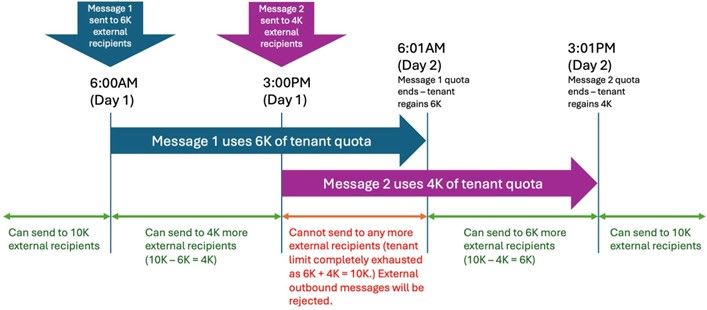
If your tenant exceeds its outbound sending limit, subsequent messages sent to external recipients will be blocked and senders will receive a bounce-back message until the volume of external recipients from the last 24 hours drops below the limit.
Example: A single-seat tenant with 10000 external recipients per day limit. Tenant sends two large messages to external recipients:
- Message 1 - sent to 6K external recipients at 06:00 on Day 1
- Message 2 - sent to 4K external recipients at 15:00 on Day 1
 Where higher‑volume external email is required, Microsoft recommends using Azure Communication Services Email or other purpose‑built bulk email solutions instead of Exchange Online.
TERRL rollout schedule
For tenants in WW environemt:
|
Phase |
Enable enforcement for tenant group |
Rollout start date |
|
1 |
Tenants with <= 25 email licenses |
Thursday 3 April 2025 |
|
2 |
+ additional tenants with <= 200 licenses |
Friday 18 April 2025 |
|
3 |
+ additional tenants with <= 500 licenses |
Monday 28 April 2025 |
|
4 |
501 - 800 licenses |
Wednesday 11 March 2026 |
|
5 |
801 - 1,000 licenses |
Wednesday 18 March 2026 |
|
6 |
1,001 - 1,500 licenses |
Wednesday 25 March 2026 |
|
7 |
1,501 - 3,000 licenses |
Wednesday 1 April 2026 |
|
8 |
3,001 - 10,000 licenses |
Wednesday 8 April 2026 |
|
9 |
more than 10,001 licenses |
Wednesday 15 April 2026 |
For tenants in the GCC environment:
|
EAC report enabled |
Tuesday 30 June 2026 |
|
Enforcement enabled |
Tuesday 1 September 2026 |
Please note that GCC customers might have inconsistent experience with trying to access the report before July 2026 (report is blank/ report is not available at all).
Monitoring and visibility
To help you plan and track your outbound email volume, Microsoft is introducing a new report in the Exchange Admin Centre (EAC) called Tenant Outbound External Recipients, which shows:
- The tenant’s current external recipient limit
- How much of the limit has been used
- Number of recipients blocked if limit is exceeded
- Current volume of external recipients
- If enforcement for the limit is enabled/disabled.
How can Softcat support your organisation?
- Explain the new outbound limit and how limits are calculated
- Support if you hit the outbound email limit
- Licence/tenant reviews and cost optimisation
You can speak to your Softcat Account Manager or contact our Sales team today to prepare for the changes. Although, for most organisations Microsoft expects no impact, as typical user‑to‑user communication falls well below the new limits. However, you should review your environment if your organisation sends large volumes of daily external emails.