






Srikanth Vasireddy
Senior Technical Consultant - Public Cloud (AWS)
AWS Cost and Usage Reports is a service that monitors the usage of AWS services and provides estimated charges for all AWS accounts within an organisation. These reports include detailed line items for each unique combination of AWS accounts, services, usage types, resource IDs, and operations utilised within the AWS account.
AWS Cost and Usage Reports offer the flexibility to customise data aggregation by hour, day, or month, depending on preferences and requirements. The generated report files can be delivered and stored directly in a designated Amazon S3 bucket.
This blog post will break down how to consolidate the cost and usage reports from multiple AWS organisations into a single data source, and how to create customised Dashboards in QuickSight.
Streamlining AWS Cost Usage Reports with Centralised S3 Buckets, Lambda, Athena, and QuickSight
High-level overview of the setup:
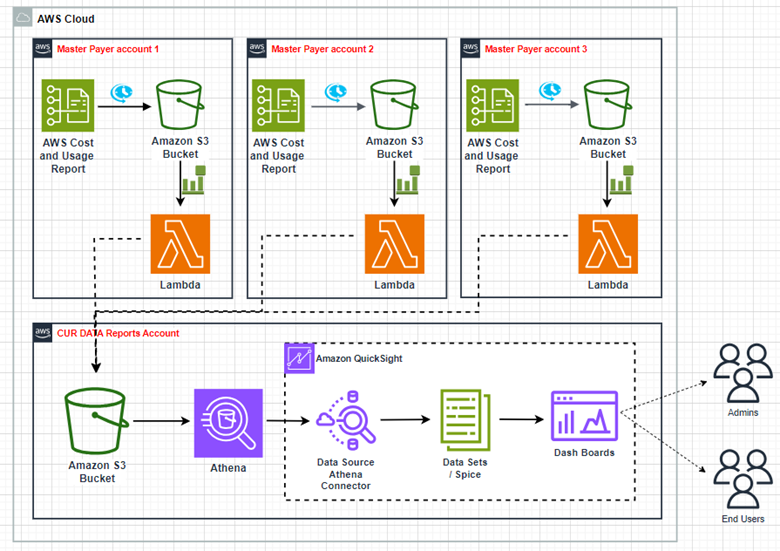
Centralised Cost Usage Reports
Daily Cost and Usage Reports are generated in each management payer AWS account and stored in their respective S3 buckets.
During the report configuration process, to configure Athena integration select the checkbox next to "Enable report data integration" for the corresponding option. Selecting this option indicates that cost and usage data will be generated in Apache Parquet format. The data will be automatically partitioned into folders organised by year and month within your S3 storage.
To obtain a comprehensive view of costs across various organisations and accounts, it is crucial to consolidate all these reports into a centralised S3 bucket within the data controller's AWS account. This centralised approach streamlines data management and facilitates efficient analysis.
Setting up S3 buckets
To ensure accurate and timely cost tracking, AWS Cost and Usage Reports should be configured to generate daily reports and deliver them to designated S3 buckets for each payer account.
A central S3 bucket should be established within the data controller AWS account to serve as a repository for Cost and Usage Reports from all payer accounts. The reports must be copied to this central bucket and arranged in folders according to AWS organisation names. By consolidating cost data from the entire organisation into a single, centralised location, this bucket will function as the authoritative source for cost analysis and reporting across all accounts.
Automating data consolidation with AWS Lambda
AWS Lambda can be utilised to automate the process of copying daily reports from individual payer account buckets to the central S3 bucket. By configuring Lambda functions to be triggered by S3 events, such as the addition of a new file to a bucket, the system can automatically detect and handle new reports.
Upon triggering, the Lambda function will copy the newly added file to the central bucket, placing it in the appropriate prefix based on the AWS organisation name associated with the source bucket. This automation ensures that daily reports are efficiently consolidated in the central location without manual intervention.
Querying cost and usage reports using Amazon Athena
Amazon Athena is used to directly query the consolidated Cost and Usage Reports that are stored in a designated Amazon S3 bucket. By connecting Athena to the S3 bucket, the data can be queried using standard SQL and define Athena tables to map the structure of the Cost and Usage Reports stored in the central S3 bucket. Views can be created in Athena to aggregate data across different dimensions, such as daily cost, monthly cost, service-specific costs etc.
This Athena serverless interactive query service allows access to detailed billing data related to AWS costs and usage.
Connecting to QuickSight for Dashboards
QuickSight can leverage Athena as a data source to build powerful and insightful dashboards. This integration allows users to analyse and visualise large datasets stored in S3 without the need to manage infrastructure or complex ETL processes.
In QuickSight, create a new data source and connect it to Athena. Select the relevant tables and views created in Athena. By connecting QuickSight to Athena, users can quickly explore data, gain valuable insights, and create visually appealing dashboards to share with stakeholders. This provides visibility into AWS spending and helps identify opportunities for cost optimisation.
Conclusion
This streamlined approach simplifies cost management and empowers decision-makers with the data needed to optimise AWS usage and reduce costs. It also helps gain comprehensive insights into cloud spending.
Softcat can support customers by helping to automate and centralise AWS Cost and Usage Reports into a single data source, generating reports and dashboards for all AWS organisations. Please contact your Softcat Account Manager or get in touch with our Sales team to find out more.