






Mark Swift
Senior Architect - AWS
Mark Swift Linked In
Transitioning to cloud-based database systems is a critical aspect of modernising IT infrastructure. These transitions do however come with challenges, and that’s where AWS’ Data Migration Service (DMS), Schema Conversion Tool (SCT) and Fleet Advisor comes in. SCT and DMS can help solve these challenges and make database transitions smooth, simple and efficient.
The challenge
A common challenge of this transition is correctly translating and moving the data from one data platform to another i.e. migrating from a data source to a data target. This challenge can arise whether it's a homogeneous transition from a similar database engine, such as Microsoft SQL Server to AWS RDS SQL Server, or a heterogeneous transition from a different database engine, such as an Oracle data warehouse to AWS Redshift.
A quick nod to AWS’ Fleet Advisor
This blog post will look at DMS and SCT in detail, but we before we dive in, let's quickly touch on AWS’ Fleet Advisor. This tool automatically inventories databases and identifies potential paths to accelerate migrations. Fleet Advisor can also gather performance metrics and usage patterns and combine them with database licence and feature information to recommend potential database engine and instance options for migration to AWS.
Schema conversion tool (SCT)
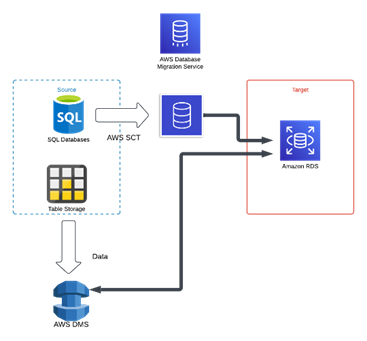
The SCT tool converts database schemas from one version to another. SCT has a list of compatible data sources and targets, which can be found here. SCT can be run as a standalone client that is downloaded to the source environment, or run within the AWS console in the AWS Database Migration Service. The console version is called DMS SCT and has fewer features than the client version.
Features of the SCT
The SCT has features that transform database schema objects into formats compatible with the target database, including tables, indexes, views, and stored procedures. In addition to relational data conversions, SCT has built-in data warehousing support, such as AWS Redshift.
SCT provides detailed reports that offer insights and suggestions that help plan the migration approach. This is done by identifying compatibility issues and areas that need to be addressed before the migration. Typically, the compatibility issues tend to be features that exist on the source database platform that would require remediation before migration to the target database platform. An example could be recompiling stored procedures or changing the data type for a database table column.
The report also has the following features:
- A database migration assessment.
- A summary of your schema conversion tasks
· Details for items that can't be automatically converted to your target database
· The SCT will automate most schema conversions, but some complex tasks may require manual work. To support the manual conversion processes, the SCT will provide additional detailed guidance within the report.
Some benefits of using AWS’ SCT include a simplified migration process. SCT reduces the complexity of migrating database schemas to AWS, by automating a significant portion of the conversion process. This results in a more straightforward and faster migration.
The SCT wizard
SCT also has a wizard-based approach. We can create a new database migration project using the new project wizard feature. The wizard assists you in determining your migration target and connecting to your databases. It also estimates how complex a migration might be for all supported target destinations. After you run the wizard, SCT produces a summary report for migrating your database to different target destinations. You can use this report to compare possible target destinations, choose the optimal migration path, and help plan this work.
Database Migration Service (DMS)
Once the SCT has converted the schema between the source and target database platforms, they can be applied to the target database. This is where DMS comes into play.
DMS is a set of tools to migrate the data between the source and target database and is run within AWS - either in the console or via the AWS Command line interface (CLI). DMS can migrate data between relational databases, data warehouses, NoSQL databases, and other data platforms.
Data collector agents are used for the discovery of data infrastructure and are used with DMS Fleet Advisor. A comprehensive list of DMS data sources can be found here, and their targets are here.
A high-level overview of DMS
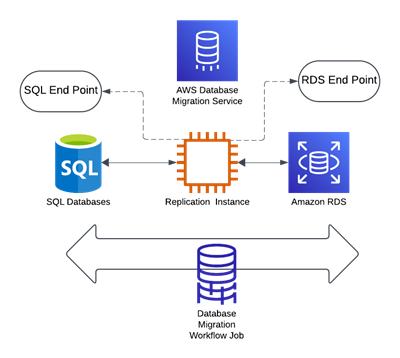
When configuring DMS to migrate the data, three main steps need to be completed:
1. Create the replication instance, which is the server that automates the replication process.
2. Create endpoints for the source and target data - the replication server uses these for connection details.
3. Complete one or more migration workflows which define the details of the migration activity, such as:
- Migration of existing data
- Apply cached changes
- Perform an ongoing replication.

The replication server
The replication server sits between the source and target data and has the following features:
- The replication server connects to the source and target public IP address, so a Nat Gateway needs to be set up in the VPC (Virtual Private Cloud) it resides in
· Source and target data sources will need Public IPs
· AWS DMS Endpoint can be utilised to route traffic internally.
- The server uses the DMS target endpoints to connect to the source and target data.
- The server can be deployed in high availability or as a single node.
The replication server
The replication server sits between the source and target data and has the following features:
- The replication server connects to the source and target public IP address, so a Nat Gateway needs to be set up in the VPC (Virtual Private Cloud) it resides in
· Source and target data sources will need Public IPs
· AWS DMS Endpoint can be utilised to route traffic internally.
- The server uses the DMS target endpoints to connect to the source and target data.
- The server can be deployed in high availability or as a single node.
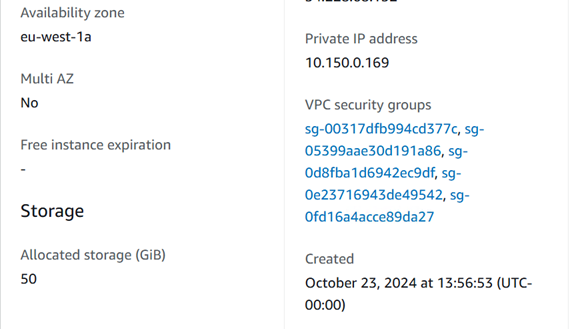
- When you create the replication instance, you select the VPC for deployment and security groups
· You can associate more than one security group with the instance, as in the configuration details.
DMS target endpoints
The target endpoints are connection details for the replication server to use when migrating the data from the source to the target. Here are some of its features:
· Two endpoints are created - one for the source and the other for the target. In the image below, the source is a standalone MSSQL instance on EC2, and the target is AWS RDS SQL Server:

- If the target is a RDS (Relational database service) instance, then the RDS connection string is used.
- If the source or target is a data HOST, then connecting to its private IP is more straightforward.
- A DNS record must be set up to connect to the HOST name.
- Connections can be encrypted using SSL (TLS).
- Like most data connections, a user and credentials (such as a username and password) must exist so they can be referenced to access the data source, database port and default data source to connect to.
- Testing the data connections with the replication server to verify the connectivity is possible.

Migration workflow
A migration workflow task defines the steps and actions that happen during the transition. These include the options for Change Data Capture (CDC), which is a method to track and record changes made to data, capture modifications like inserts, updates, and deletes, and store changes for analysis or replication. For example:
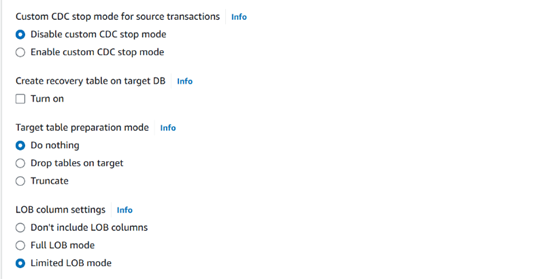
Some other configurable features of the migration task include:
- The option to migrate only, migrate and replicate or replicate only.

- The option to validate the data in the migration.

The workflow seamlessly integrates with CloudWatch Logs for greater observability. When large data migrations occur, such as data warehouse migrations to AWS Redshift, there are options to send the data in batches.
A pre-migration assessment can also be enabled to evaluate specified components of a database migration task and help to identify any problems. The assessment identifies issues and allows them to be fixed before the migration is run.
AWS DMS provides access to two different options for pre-migration assessments:
- Data type assessment: a legacy report providing a limited assessment scope.
- Pre-migration assessment run: contains various individual assessments, including data type assessment results.
Use cases where SCT and DMS can be utilised
1. Migrating to Amazon RDS
Suppose you have business drivers where you are required to offload some of the work and responsibility of the current DBA (Database Administration) team. In that case, you might consider a database PaaS (Platform-as-a-service) solution and a homogeneous migration to the AWS RDS, a managed database service. By performing a homogeneous migration, you are reducing the risk of recoding and configuring the application and business process that interacts with the database, as well as maintaining familiarity with the database platform. Subsequently the DBA and development team can utilise their current skills to complete the migration, rather than requiring them to reskill against a new platform.
2. A data warehouse migration - such as Oracle Data Warehouse to AWS Redshift
As an organisation, you may wish to reduce the licensing cost by running the Data Warehouse solution in AWS on Amazon Redshift and using AWS' elasticity and high availability to meet new drivers around performance and tolerance to your business solutions. With AWS Redshift, it's easy to scale the nodes to provide more computing during critical reporting periods and leverage cluster availability failover to mitigate site failing scenarios.
Other instances where SCT and DMS can be used include testing production data or other environmental data (without affecting the underlying application), combining multiple databases into one, or migrating data to other data sources (either homogeneous or heterogeneous).
Conclusion
In this blog, we have looked at some of the characteristics of the AWS SCT and DMS services to understand how the components are configured to perform migrations. By simplifying the schema conversion and data migration process with a set of feature-rich services, both DMS and SCT are powerful tools for businesses looking to perform application modernisation of their database platforms
As an AWS Premier Consulting Partner with competencies in migration and DevOps, Softcat is positioned to help your organisation on its AWS application modernisation journey.
If you are interested in migrating your database workloads to AWS, please get in touch today: aws@softcat.com.